01
The shared inbox problem
Everyone can see the same emails, but nobody automatically knows who owns what. That leads to duplicated work, missed messages and confusion.
Founding offer: 50% off for as long as you remain subscribed. Limited to the first 5 customers.View plans→
MailCalm automatically assigns incoming Microsoft 365 team email to the right person while everyone keeps working in Outlook. Round robin shares new work fairly; ownership and specialist rules keep other messages with the people who should handle them.
Your team carries on working in Outlook exactly as they do now. No helpdesk. No shared-inbox platform. No claiming emails, checking queues or learning a new workflow. They simply receive the emails they are responsible for.
Built for Microsoft 365 teams on Windows and Mac. Windows 11 or macOS 13 Ventura or later. One designated computer runs MailCalm; your team stays in Outlook.
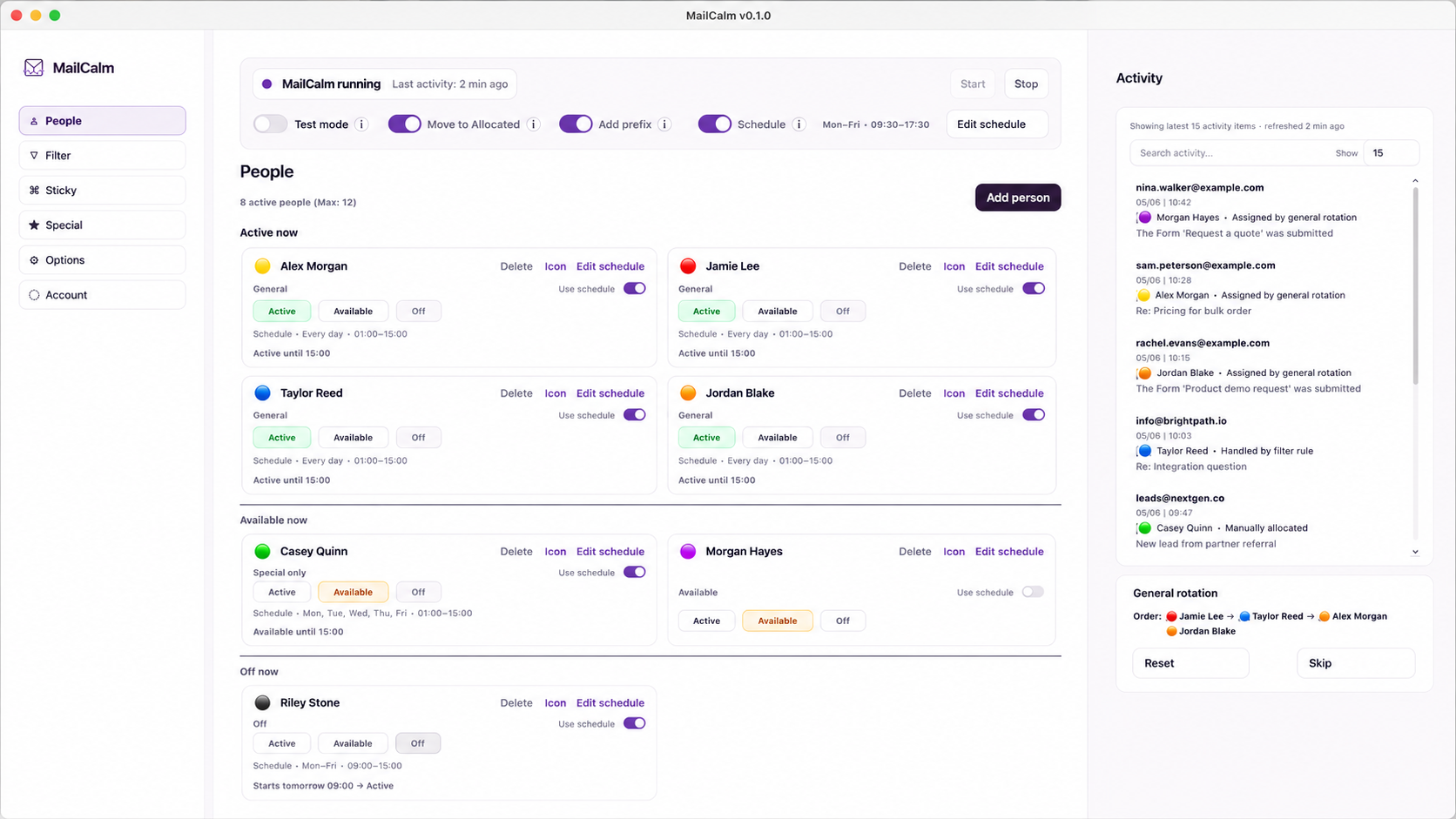
Set the rules once and MailCalm handles the distribution. You don’t have to keep watching the shared inbox or deciding who gets the next email. You can get on with managing the team, knowing incoming work is being shared fairly. Your team carries on working in Outlook.
Built for two or more people sharing a Microsoft 365 inbox, MailCalm gives incoming enquiries a clear owner instead of leaving the team to pick emails or forward them manually.
Everyone can see the same emails, but nobody automatically knows who owns what. That leads to duplicated work, missed messages and confusion.
MailCalm removes the need for people to pick and choose. New work enters a fair round robin across the available team, giving every lead or enquiry a clear owner.
MailCalm checks ownership, customer replies, specialist rules, availability and individual schedules before using the round robin, so each email reaches the right eligible person.
“I just wanted round robin for our emails. I didn’t want another platform, another workflow or a load of extra features. I wanted to switch it on, let it sort the emails out and stop thinking about it.”
That was the brief when I started building MailCalm. After countless conversations with other email-platform providers, I kept finding the same thing: round robin always came bundled with far more than I wanted or cared about.
Then, while building MailCalm, I learned that proper round robin needs a few quiet safeguards behind the scenes to work as people expect. MailCalm handles those details for you, without giving the team anything extra to learn or manage.
You get simple round robin. MailCalm quietly takes care of the bits that stop it going wrong.
Set it up, switch it on and stop thinking about who gets the next email.
Each email passes through a clear rule order. If MailCalm finds a clear owner, it keeps the email with them. If not, it uses fair round robin. And if an email reaches the wrong person, they can forward it back for safe reallocation.
Already involved? Keep it with them.
Remove noise before it joins the queue.
Returning customer? Keep the same owner.
Specialist request? Use a named person or its own rotation.
No clear owner? Share it fairly.
Return to Rotation is a separate reallocation action. If an email is not for you, forward it back for safe reallocation.
See how new enquiries, customer replies, urgent requests, holiday cover and website forms are routed, and exactly why.
MailCalm keeps a clear record of every allocation. When the Allocated-folder option is enabled, the original email stays in the Microsoft 365 mailbox and is moved to the Allocated folder with the owner clearly labelled. Managers can quickly see that work has been distributed, who owns each email and whether anything needs checking.
Your team can continue working from their own Outlook inboxes, while the team mailbox keeps a clear record of allocation.
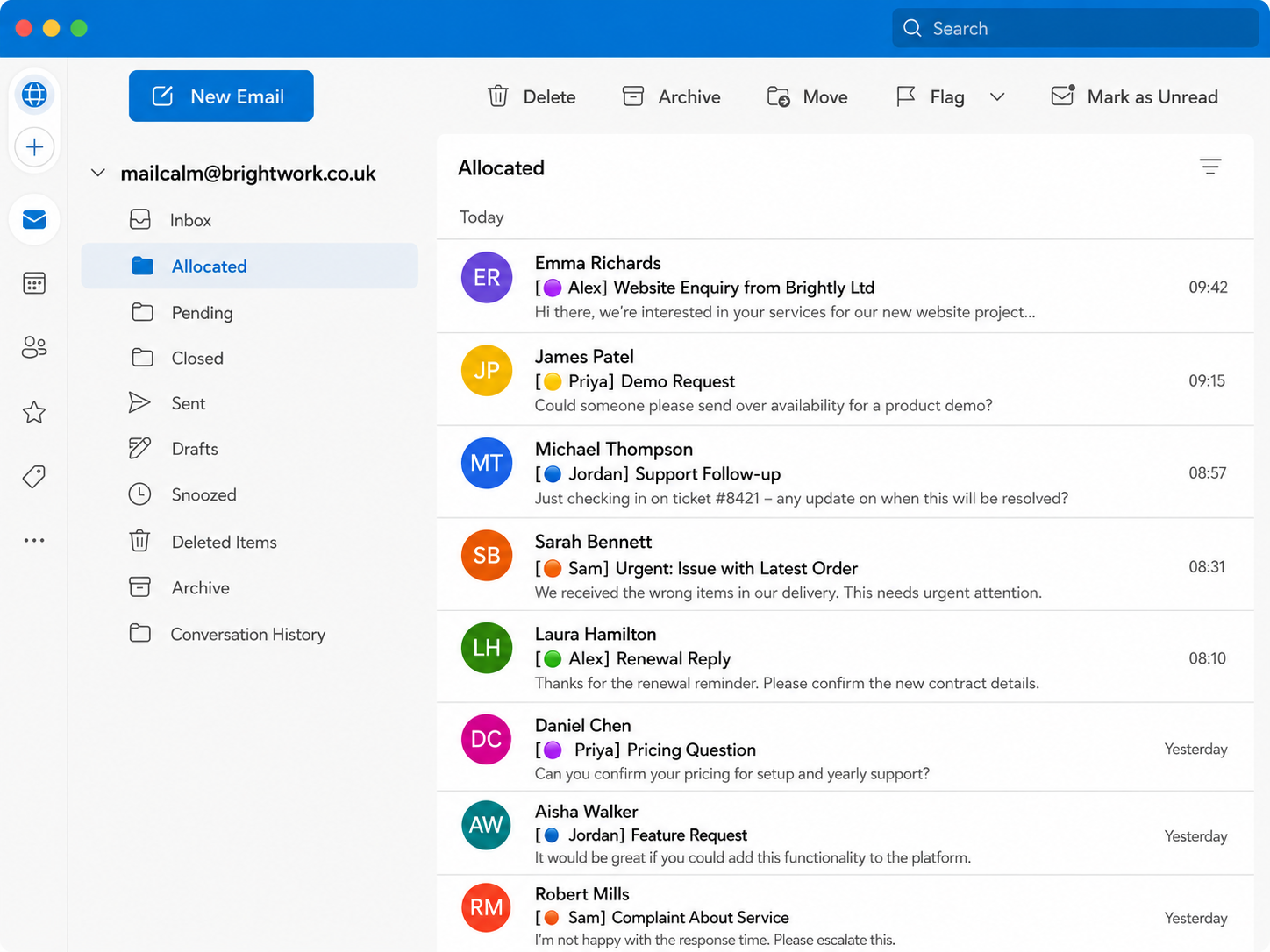
MailCalm runs on one designated computer and connects to your Microsoft 365 team mailbox. The routing manager sets everything up in the MailCalm Control Panel. Everyone else simply carries on working from their usual inbox.
Ordinary staff do not need MailCalm installed and do not log into MailCalm. MailCalm quietly forwards each allocated email to the selected person’s chosen email address, wherever they normally handle email. For Outlook teams, that usually means the message arrives in the normal Outlook inbox they already use.
Each person receives their allocated emails in the inbox they already use. Outlook is the normal setup, but MailCalm can forward to another chosen email address when needed.
Set when MailCalm should run, pause routing outside your chosen hours, and give each team member their own working schedule, availability and holidays.
No browser dashboard, Outlook add-in, helpdesk, portal, CRM or ticketing system for staff to learn. The team does not use MailCalm. They simply receive the emails they are responsible for.
MailCalm follows clear routing and ownership rules, so every decision is predictable, consistent and visible in Activity.
If the routing computer is temporarily unavailable, MailCalm pauses safely. New emails remain in the Microsoft 365 mailbox until routing resumes or they are handled manually.
MailCalm is designed to be set up and running in a morning or afternoon. Download the app, connect your Microsoft 365 shared mailbox, add your team, set their schedules, test the routing and switch to Live mode.
There is no email migration, no new workspace to roll out and no new system for the team to learn. Once MailCalm is running, staff simply carry on working from the inbox they already use.
Set aside a morning or afternoon. By the end of it, your shared inbox could have proper round robin up and running.
Microsoft 365 access and permissions need to be in place before setup can be completed.
Tell us how your shared inbox works today, whether you allocate emails manually or leave the team to pick them up. We’ll help you work out whether MailCalm is a sensible fit. Whether you use Windows or Mac, we’re happy to arrange a short demo if you’d like one.